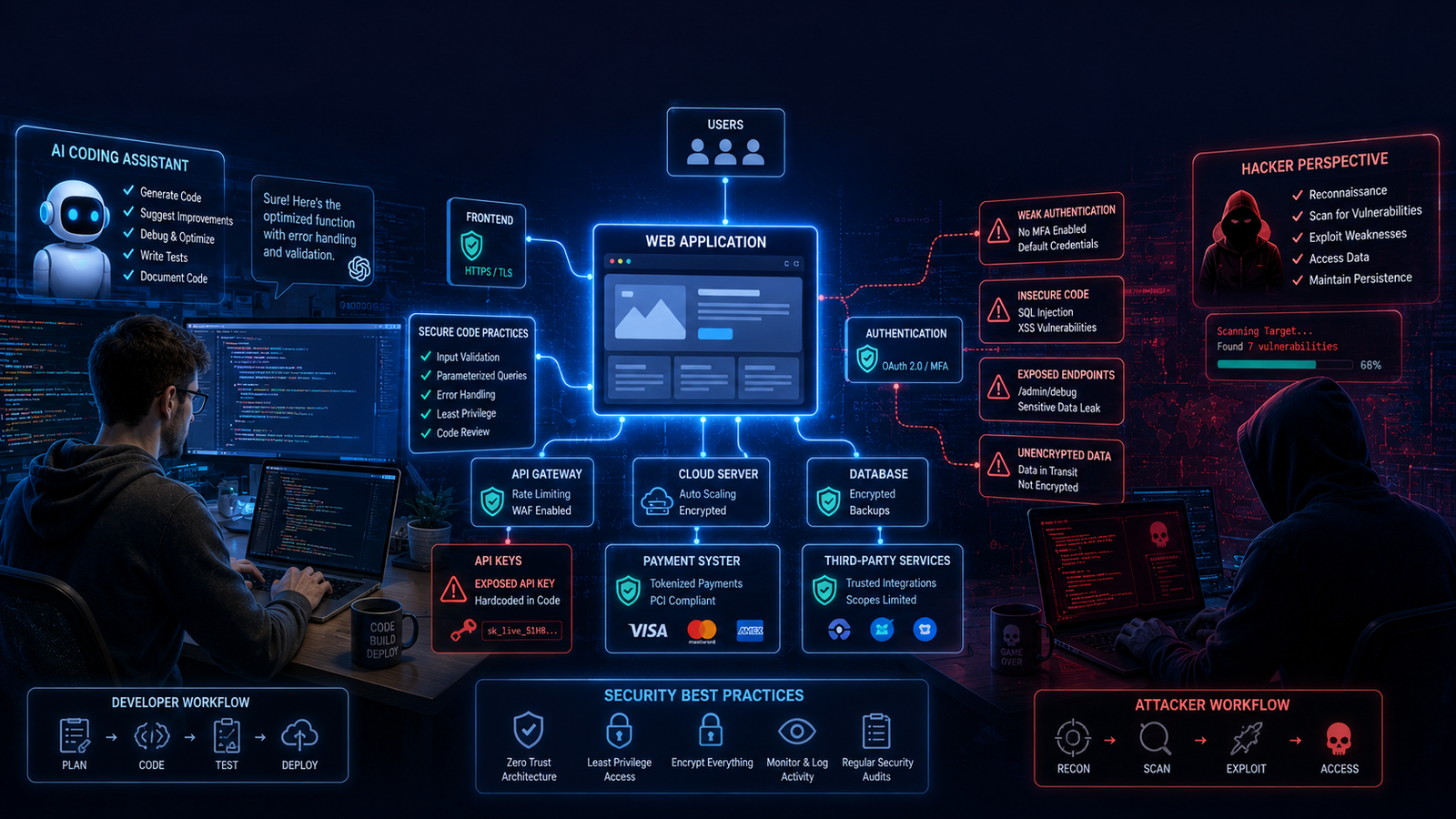
AI can write thousands of lines of code. But it won’t take responsibility when something goes wrong.
A few years ago, building a web application required weeks of coding, debugging, and testing.
Today?
You can describe your idea to ChatGPT, Claude, Cursor, or GitHub Copilot, and within a couple of hours, you’ll have a working app.
That’s incredible progress.
But here’s the question very few people ask:
Just because your app works… does that mean it’s secure?
For many new developers, startup founders, and indie hackers, AI has removed the biggest barrier to software development—writing code.
Unfortunately, it hasn’t removed the biggest challenge:
Writing secure code.
Security experts have been raising this concern as AI-assisted development becomes more common. Even the OWASP Secure Coding with AI Cheat Sheet reminds developers that AI coding assistants should improve productivity—not replace human security reviews or secure development practices.
Think about it like this.
Imagine AI helps you build a beautiful house in one afternoon.
The walls look perfect.
The paint is flawless.
Everything works.
But nobody checked whether the front door actually locks.
That’s exactly what can happen with AI-generated applications.
The app may function perfectly while hiding security mistakes that only become visible after real users—and sometimes attackers—start interacting with it.
Mistake #1: Accidentally Exposing Your API Keys
Let’s start with one of the most common mistakes beginners make.
Suppose you’re building an AI-powered application using ChatGPT, Claude, or another AI service.
To connect your app, you’ll receive an API key—a secret credential that allows your application to communicate with the provider.
Think of it like the master key to your account.
If someone else gets that key, they can use your account as if they were you.
The problem is that many developers accidentally leave these keys inside their frontend code or upload them to public GitHub repositories.
That isn’t just a small mistake.
GitHub has an entire Secret Scanning system dedicated to detecting exposed credentials because leaked API keys, passwords, and access tokens are such a widespread security problem. Once those secrets become public, they can be abused before the developer even realizes they’ve been exposed.
The consequences can vary.
In some cases, attackers use stolen API keys to make thousands—or even millions—of automated requests, leading to unexpectedly high cloud or AI API bills.
Others may use those credentials to access systems that were never meant to be public.
The lesson is simple:
Never place API keys directly inside frontend code or public repositories. Store secrets securely using environment variables or a dedicated secrets manager.
AI can help write your application.
It cannot decide where your secrets belong.
Mistake #2: Letting User Data Leak Without Realizing It
Now imagine your app finally launches.
Within a few weeks, hundreds of people have signed up.
They’ve entered their names, email addresses, passwords, payment information, or personal messages.
Everything seems to be working perfectly.
But behind the scenes, your application is quietly recording sensitive information inside log files or sending more data than necessary to external services.
Most users will never notice.
Hackers will.
Sensitive information appearing in logs, configuration files, or third-party systems can become a serious security risk if those systems are later compromised. OWASP also warns developers to be careful about where secrets and sensitive project information are stored, especially when using AI-assisted development tools.
This is why experienced developers ask an important question before deploying any application:
“Where is my users’ data actually going?”
If you can’t answer that confidently, your app probably needs another security review.
The good news is that this problem is preventable.
Modern AI coding tools can even help review your codebase for accidental data exposure—but only if you know enough to ask the right security questions.
So far, we’ve covered two of the biggest mistakes developers make when building apps with AI:
- Exposing API keys
- Accidentally leaking user data
Now let’s look at three more security issues that can quietly turn a working app into an easy target.
Mistake #3: Revealing Too Much When Something Goes Wrong
Every app crashes at some point.
That’s normal.
The real question is:
What does your app show when it crashes?
Imagine a user encounters an error page that displays something like this:
					Database Connection Failed

MySQL Server: db-production-01

/users/admin/config.php

Stack Trace:
...
To an ordinary user, this looks like meaningless technical jargon.
To an attacker, however, it’s valuable information.
Error messages can reveal:
- Server structure
- Database technology
- File locations
- Framework versions
- Internal APIs
This kind of information helps attackers understand how your application is built before they even attempt an attack.
OWASP recommends returning generic error messages to users while logging detailed technical information securely on the server for developers to investigate. This reduces the amount of information attackers can gather during reconnaissance.
A good production error message should look more like this:
“Something went wrong. Please try again later.”
Simple.
Professional.
And most importantly, it doesn’t give away your application’s blueprint.
Mistake #4: Forgetting Rate Limiting
Imagine your app launches today.
Everything looks great.
Tomorrow morning, you discover something strange.
Instead of 500 new users…
You have 50,000 new accounts.
Sounds amazing?
Not if almost all of them were created by bots.
Without rate limiting, automated scripts can repeatedly hit your login, signup, password reset, or AI API endpoints thousands of times in a short period. That can lead to spam accounts, brute-force login attempts, unnecessary API costs, or even service disruptions.
OWASP recommends implementing rate limits and resource quotas to reduce abuse and improve application resilience.
Think of rate limiting as a security guard at the entrance of your app.
Normal users can walk in comfortably.
Bots trying to rush through thousands of requests are slowed down—or stopped altogether.
Even a basic limit, such as restricting repeated requests from the same user or IP address, can dramatically reduce automated attacks.
Mistake #5: Trusting the Browser More Than Your Server
Here’s a surprisingly common mistake.
Suppose your app sells a premium course for ₹999.
When a customer clicks “Buy Now,” the browser sends the payment request to your server.
If your server simply trusts the price sent by the browser, an attacker could modify that value before the request reaches your backend.
Instead of paying ₹999, they might attempt to send: ₹1
The browser belongs to the user—not to you.
That means anything running on the client side can potentially be modified.
For this reason, experienced developers never trust important values such as prices, discounts, permissions, or user roles coming directly from the browser.
Business rules should always be validated on the server before any transaction is completed. Secure code review guidance emphasizes enforcing business rules and authorization on the backend rather than relying on client-side logic.
The golden rule is simple:
Never trust the client. Always verify on the server.
One Tiny URL Change That Could Expose Someone Else's Data
Let’s finish with one of the most famous web security mistakes.
Imagine your profile page looks like this:
example.com/user/123
Out of curiosity, someone changes it to:
example.com/user/124
If another person’s profile suddenly appears…
Your app has a serious security problem.
This vulnerability is known as Insecure Direct Object Reference (IDOR), now commonly categorized under Broken Object Level Authorization (BOLA). It happens when an application checks who the user is but forgets to verify whether that user is allowed to access the requested resource.
To prevent this, every request should include an authorization check—not just an authentication check.
Logging in proves who the user is.
Authorization determines what that user is allowed to access.
They are not the same thing.
Before You Launch, Think Like an Attacker
One habit separates experienced developers from beginners.
Before releasing an app, they stop thinking like builders.
They start thinking like attackers.
They ask questions such as:
- What if someone changes this URL?
- What if this request is repeated 10,000 times?
- What if this value is modified before it reaches the server?
- What happens if my app crashes?
- What information am I accidentally exposing?
This mindset often catches problems that automated AI coding tools may miss.
AI can generate code remarkably quickly.
But security isn’t just about writing code.
It’s about questioning every assumption before your users—or an attacker—do.
Quick Security Checklist
Before launching your app, ask yourself these questions:
✅ Are all API keys stored securely?
✅ Have I removed sensitive information from logs?
✅ Are production error messages generic?
✅ Is rate limiting enabled?
✅ Are payment calculations performed on the server?
✅ Can users access only their own data?
✅ Have I tested the app like an attacker would?
If you answered “No” to even one of these questions, it’s worth fixing that issue before going live.
Quick Summary
Key Takeaways
- AI can dramatically speed up software development, but it doesn’t replace secure coding practices.
- Never expose API keys, passwords, or tokens in public code repositories.
- Keep sensitive user information out of logs and unnecessary third-party services.
- Hide detailed error messages from users while logging them securely for developers.
- Use rate limiting to reduce abuse from bots and automated attacks.
- Always validate payments, permissions, and business rules on the server.
- Test your application from an attacker’s perspective before deployment.
FAQs
1. Can AI build a secure app on its own?
Not completely.
AI coding assistants can generate functional code much faster than humans, but they don’t automatically understand your application’s business logic, security requirements, or threat model.
Think of AI as a very fast junior developer—it can save hours of work, but every important piece of code still needs human review, especially anything related to authentication, payments, user data, and security.
2. What's the biggest security mistake beginners make?
One of the most common mistakes is exposing API keys, passwords, or access tokens in source code or public repositories.
These secrets can be discovered by automated scanners and abused if they aren’t stored securely.
The safest approach is to keep sensitive credentials in environment variables or a dedicated secrets manager instead of hardcoding them into your application.
3. Is AI-generated code less secure than human-written code?
Not necessarily.
AI can generate both secure and insecure code.
The real problem is that many developers accept AI-generated code without reviewing it carefully.
Security experts recommend treating AI-generated code exactly like code written by another developer—it should be tested, reviewed, and validated before deployment.
4. Why is rate limiting important?
Without rate limiting, attackers can:
- Create thousands of fake accounts
- Attempt password guessing attacks
- Abuse AI APIs
- Overload your servers
- Increase your cloud costs
Rate limiting helps ensure that users—and automated bots—cannot send unlimited requests in a short period of time.
5. What's the best way to secure an AI-built application?
There isn’t one magic solution.
Instead, combine several good security practices:
- Review AI-generated code before deployment.
- Protect API keys and secrets.
- Validate inputs on the server.
- Enable authentication and authorization checks.
- Implement rate limiting.
- Hide detailed error messages in production.
- Regularly test your application from an attacker’s perspective.
Security isn’t a feature you add at the end.
It’s a habit you practice throughout development.